

6 Steps to Avoid Audit Gaps in U.S. Security Guard Licensing
Verify the guard through the official state registry or, where the state licenses only agencies, obtain a signed roster and attestation. Confirm fingerprint or Live Scan transaction evidence when the state requires it. Then run a separate, FCRA-compliant employer background check covering criminal history, motor vehicle records, and employment verification, and retain every transaction ID and authorization form. Licensing checks confirm eligibility; they don’t replace an employer’s own screening.
TL;DR:
- State registry searches must be conducted through official portals using the exact license type, with proof such as transaction IDs or screenshots retained for records.
- Fingerprint submissions via Live Scan generate ATI numbers that serve as evidence of criminal history checks, which can take from minutes to days depending on the state.
- Employer background checks under FCRA rules require separate disclosures and authorizations, with clear documentation of each step to stay compliant during possible disputes.
- If states license only agencies, employers must verify officer rosters and attestations, and treat any refusal to provide documentation as a red flag that warrants halting the hire.
- Using a centralized screening platform can streamline documentation, reduce administrative errors, and ensure a robust, auditable trail for audits or disputes.
Table of Contents
- What Are the Steps in a Security Guard Licensing Check?
- How Do I Check a State Registry or Run a Live Scan?
- What Must Employers Do Under the FCRA?
- Company License or Individual Guard Registration: Which Do You Check?
- How Long Does Verification Take, and Who Pays?
- How Does OMNI Intel Support Compliant Licensing Checks?
- Author’s Perspective: Speed Versus Compliance in Real Hiring Decisions
- Get Started With OMNI Intel’s Screening Platform
- Sources
- FAQ
What Are the Steps in a Security Guard Licensing Check?
Build this into your intake workflow so no candidate reaches a post before every box is checked.
- Pull the license or registration record. Search the state’s official registry, or, if the state only licenses the agency, request a signed roster with an attestation letter.
- Capture proof of the search. Save a screenshot or printed summary showing the transaction ID, search date, and result.
- Confirm fingerprint evidence. If the jurisdiction mandates Live Scan or another fingerprint submission, get the ATI or transaction number before finalizing an offer.
- Run your own FCRA-compliant background check. Criminal history, motor vehicle records, employment verification, and drug screening (if your policy requires it) all sit outside the licensing check.
- Verify armed permits separately. An unarmed guard credential does not authorize armed duty; confirm the specific permit if the role calls for one.
- Check insurance documentation for contract agencies. Request a current certificate of insurance before the guard sets foot on your property.
- Registry transaction IDs and screenshots
- Live Scan ATI numbers
- Signed disclosure and authorization forms
- Armed permit copies and insurance certificates
Pro Tip: Build a single intake folder per candidate, named with the hire date and last name, and drop every transaction ID, screenshot, and signed form into it the day you generate it. Retroactively reconstructing a paper trail six months later, during an audit or a claim, is far harder than filing it once.
How Do I Check a State Registry or Run a Live Scan?
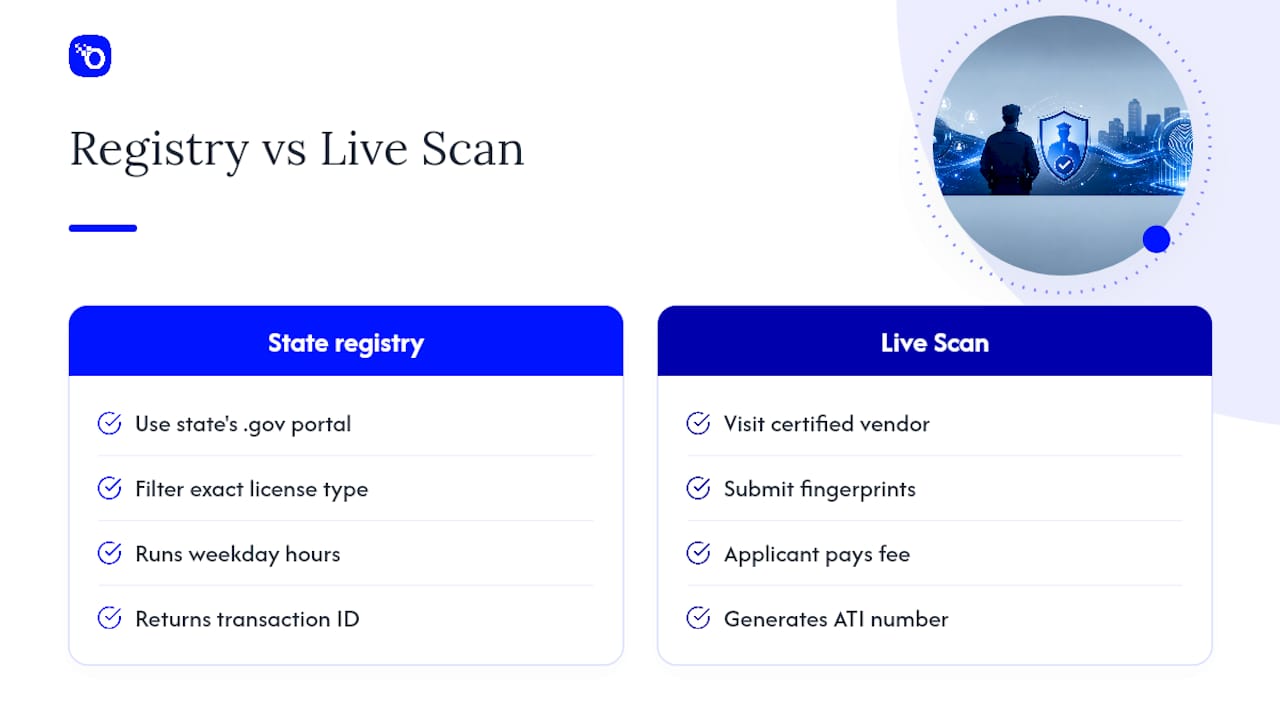
Start at the state’s own .gov licensing portal, not a third-party lookup tool, and filter by the exact license type your role requires (unarmed, armed, proprietary, contract). Generic search engines often surface outdated aggregator sites that show lapsed or expired records as active.
New York offers a clean example of how a registry check actually works. Employers use an eleven-digit Employer UID to search the Online Security Guard Registry, which returns a transaction ID, the guard’s registration status, and an “OK to hire” determination. The registry runs limited hours, typically early morning to evening on weekdays, so build that window into your intake scheduling rather than assuming round-the-clock access. NYS guidance instructs employers to print and retain the transaction summary as proof of due diligence, a habit worth adopting even in states without an explicit retention rule.
Fingerprint checks follow a separate track. Many states require submission through Live Scan, where the candidate visits a certified vendor location, pays the fee (commonly the applicant’s responsibility), and the transaction generates an ATI number tied to the DOJ/FBI fingerprint record. Federal rules under 28 CFR § 105.23 govern how authorized employers request state and national criminal history checks tied to private security officer roles. Our breakdown of fingerprint checks in public safety hiring walks through the full sequence in more detail.
If a candidate holds credentials in more than one state, verify each one independently. A license valid in one jurisdiction rarely transfers automatically to another.
What Must Employers Do Under the FCRA?
Licensing checks and employer background checks are legally distinct activities, and conflating them is one of the more common compliance gaps in public safety hiring. The Fair Credit Reporting Act governs any employer background check pulled through a consumer reporting agency, and it applies the moment you order criminal history, credit, or driving records from a third party rather than a government registry.
Before you order the report, you need written disclosure and separate written authorization from the candidate under 15 U.S.C. § 1681b. Skipping either step, or bundling them into a single generic hiring form, exposes the agency to a claim even when the underlying finding is accurate.
If a report turns up something that could justify rejecting the candidate, the pre-adverse action step comes next:
- Send the candidate a copy of the consumer report and the Summary of Rights under 15 U.S.C. § 1681m.
- Give the candidate a reasonable window to respond or dispute the findings before you finalize a decision.
- Issue a final adverse action notice naming the reporting agency, confirming that agency did not make the hiring decision, and stating the candidate’s right to dispute the report.
Keep licensing-board findings and employer-report findings in separate files. Using a registry result to justify an adverse action notice meant for FCRA-covered data (or vice versa) muddies your record and complicates a later dispute. Our FCRA-compliant screening guide for armed and unarmed officers covers disqualifying-conduct standards in more depth.
Pro Tip: File the licensing registry printout and the FCRA consumer report in physically (or digitally) separate folders. An auditor reviewing your adverse-action file should never have to sort through unrelated document types to confirm you followed the right sequence.

Company License or Individual Guard Registration: Which Do You Check?
Not every state issues a credential you can look up per guard, and knowing which model your state uses changes your entire verification process.
- States including California, Texas, Florida, New York, Illinois, Virginia, Washington, and Arizona provide individual-officer lookups you can search directly.
- States including Massachusetts, Michigan, Indiana, and Minnesota license only the agency, with no public per-guard database.
- Where an agency license is what’s searchable, confirm the legal business name and license number match exactly, and check that the status reads active rather than expired, suspended, or pending renewal.
- Where no individual lookup exists, require a signed officer roster and attestation letter from the contract agency, updated on a fixed schedule you control, not one the agency sets.
- Verify armed permits as a separate credential from the base guard license; a facility that needs an armed post cannot rely on an unarmed registration.
- Build contract language requiring the agency to notify you and provide a replacement within a defined window if any assigned officer’s credential lapses.
If an agency refuses to produce a roster or attestation when the state offers no individual lookup, treat that refusal as a red flag serious enough to pause the placement and escalate through procurement.
How Long Does Verification Take, and Who Pays?
Timelines vary by state and by which piece of the process you’re waiting on, but a few patterns hold across most jurisdictions.
Registry lookups typically return results within minutes, assuming you’re searching during the registry’s operating hours. Live Scan fingerprint returns generally take longer, ranging from same-day to several business days depending on the state’s DOJ/FBI processing queue. Employer-side background reports (criminal, MVR, employment verification) usually land within a few business days once the vendor has authorization on file.
On fees: applicants commonly pay the Live Scan fee directly to the vendor at time of service, while employers typically absorb the cost of the FCRA-compliant background report itself, either directly or through a contracted screening vendor.
| Record to retain | Why it matters |
|---|---|
| Registry transaction ID / screenshot | Proof the licensing search happened and what it showed |
| Live Scan ATI number | Evidence fingerprint submission was completed |
| Signed disclosure and authorization | Required before ordering an FCRA report |
| Adverse action notices | Documents the decision process if challenged |
Watch for these red flags before finalizing any hire: an expired or suspended license, a name or date-of-birth mismatch between the ID and the registry record, missing Live Scan evidence in a state that requires it, or a candidate who refuses to sign the FCRA authorization. Any one of these should pause the hire until resolved. Our compliance considerations guide covers documentation expectations specific to California hiring teams, and the Central Jersey Security Cameras overview of employer obligations offers a useful industry-side view of why recordkeeping matters this much.
How Does OMNI Intel Support Compliant Licensing Checks?
Manual registry lookups and paper rosters work fine at low volume. They break down fast once a municipality, dispatch center, or private security firm is processing dozens of candidates a month across multiple states with different licensing models.
Some platforms centralize documentation instead of leaving it scattered across screenshots, email threads, and filing cabinets. Such platforms capture registry search evidence and FCRA workflow steps (disclosure, authorization, pre-adverse and adverse action notices) in one auditable record tied to each candidate file, and may integrate with existing hiring platforms so teams are not re-entering the same candidate data twice.
- Centralized evidence capture for registry searches and Live Scan transaction data
- Candidate screening tools designed to handle public safety hiring volumes
- Post-hire monitoring to flag new disqualifying events between renewal cycles
- Integration with applicant tracking and hiring systems
Licensing confirms a floor, not a ceiling. The agencies that stay out of negligent-hiring trouble are the ones that document their own independent screening on top of the state’s minimum bar, not the ones that stop at a clean registry hit.
OMNI Intel doesn’t replace your state’s official registry check. It gives you a documented, repeatable process for everything that has to happen around it.
Author’s Perspective: Speed Versus Compliance in Real Hiring Decisions
Hiring managers under staffing pressure sometimes want to deploy a guard conditionally while paperwork finishes. That’s workable, but only with guardrails: the registry search or roster attestation has to be complete and on file before the first shift, even if the FCRA report is still processing. Never let Live Scan evidence be the piece you circle back to later.
When you’re using a contract security agency, put the documentation burden in the contract itself. Require the agency to supply rosters, attestations, and proof of insurance on a fixed schedule, with an automatic replacement clause for lapsed credentials. Small teams benefit most from a single shared log, even a basic spreadsheet, tracking every transaction ID and authorization date by candidate. The goal isn’t perfect speed. It’s never having a gap in the file when someone asks for one.
— Matt
Get Started With OMNI Intel’s Screening Platform
OMNI Intel is the practical alternative to piecing together registry printouts, spreadsheets, and email chains by hand. Instead of a hiring team manually tracking transaction IDs across a dozen candidate folders, the platform documents registry evidence, Live Scan transaction data, and FCRA disclosure and authorization steps in one auditable record per candidate.

For municipalities, fire and EMS departments, dispatch centers, and private security firms managing hiring across multiple states, that centralization cuts the administrative load of proving due diligence when it matters most, during an audit, a claim, or a licensing dispute. The platform integrates with hiring systems already in use, so screening data flows into your existing workflow rather than living in a separate silo. If your team is ready to move off manual registry tracking, start with OMNI Intel’s pre-employment screening services to see how the documentation and workflow pieces fit your agency’s process.
Sources
- Online Security Guard Registry — NYS
- BSIS Live Scan guidance (California)
- 28 CFR § 105.23 — Procedure for requesting criminal history record check
This article is general information, not a substitute for advice from a qualified lawyer. Consult a qualified legal professional about your own circumstances before acting on anything here.
FAQ
Does a Clean Registry Check Mean I Can Skip a Background Check?
No. A registry or license check confirms the guard meets the state’s minimum eligibility requirements, but it doesn’t cover criminal history, employment verification, or motor vehicle records the way an FCRA-compliant employer check does.
What If My State Doesn’t Have a Public Guard Lookup?
Request a signed officer roster and attestation letter directly from the contract agency, and build a contract clause requiring notice and replacement if any listed officer’s credential lapses.
Who Typically Pays for Live Scan Fingerprinting?
In most states, the applicant pays the Live Scan fee directly to the certified vendor at the time of service, while the employer is responsible for the cost of the separate FCRA background report.
What Should I Keep on File After Verification?
Retain the registry transaction ID or screenshot, the Live Scan ATI number, signed FCRA disclosure and authorization forms, and any adverse action notices, all organized by candidate so they’re ready if an audit or dispute arises.